SAP PLM (Product Lifecycle Management) is an SAP solution for integrally managing the entire product lifecycle, supporting every process from initial product ideation through design, development, manufacturing, operation, and disposal. It plays a particularly important role in the manufacturing and process industries, providing tools and functionality that improve efficiency, reduce costs, and enhance product quality.
S/4HANA Integration and PLM Technical Characteristics
Cloud Support
Leverages the SAP Business Technology Platform, available in both on-premise and cloud environments.
Integration with SAP S/4HANA
Seamlessly integrates with other SAP modules (such as SAP ERP, SAP SCM, and SAP EHS), enabling end-to-end data connectivity.
Utilization of Intelligent Technologies
Integration with AI and IoT enables predictive maintenance and the collection and analysis of product operational data.
Key Features of SAP PLM
1. Product Data Management (PDM)
- Role
Manages basic product information, design data, specifications, drawings, bills of materials (BOM), and more. - Key Features
- Centralization of design data
- CAD integration
- Version control and change history tracking
- Integration of Engineering BOM (EBOM) and Manufacturing BOM (MBOM)
2. Change and Configuration Management
- Role
Streamlines product design changes and configuration management while improving process transparency. - Key Features
- Creation and approval process for Engineering Change Requests (ECR)
- Impact analysis of changes
- Change tracking through version control
- Product configuration management (optimization of product variants)
3. Project and Portfolio Management (PPM)
- Role
Plans, manages, and optimizes product development projects. - Key Features
- Project schedule management (Gantt charts)
- Allocation of resources and costs
- Overall portfolio management and prioritization
- Real-time monitoring of progress
4. Bill of Materials Management (BOM)
- Role
Creates and manages product bills of materials, supporting a smooth transition from design to manufacturing. - Key Features
- Management of multi-level BOMs
- Integration of Engineering BOM (EBOM) and Manufacturing BOM (MBOM)
- Tracking and updating of BOM changes
- Integration with the supply chain
5. Quality Management (QM)
- Role
Strengthens quality management from product design through manufacturing and operation. - Key Features
- Creation of quality inspection plans
- Recording and management of non-conforming products
- Collection and analysis of quality data
- Quality assurance processes that meet customer and regulatory requirements
6. Lifecycle Data Management (LDM)
- Role
Enables data management across the entire product lifecycle. - Key Features
- Data integration at each stage of the product lifecycle
- Management of information related to product disposal and recycling
- Compliance with regulatory requirements and applicable laws
7. Environment, Health, and Safety (EHS)
- Role
Manages the environmental impact of products and compliance with regulations. - Key Features
- Management of hazardous substances
- Product compliance (e.g., REACH, RoHS)
- Environmental impact assessment
- Support for sustainability-conscious product design
8. Document Management System (DMS)
- Role
Integrally manages documents related to the product lifecycle. - Key Features
- Management of design drawings, specifications, contracts, and other documents
- Configuration of access permissions
- Version control and history tracking
- Document search and sharing
9. Supply Chain Collaboration (SCC)
- Role
Supports collaboration across the entire supply chain and optimizes manufacturing and delivery processes. - Key Features
- Sharing of design data with suppliers
- Synchronization of inventory information and production plans
- Incorporating supplier feedback into design
10. Manufacturing Process Management (MPM)
- Role
Bridges the gap between design and manufacturing to support efficient production. - Key Features
- Optimization of production planning and manufacturing flow
- Creation of work instructions
- Estimation of product costs
- Collection of quality data during the manufacturing stage
11. SAP 3D Visual Enterprise
- Role
Utilizes 3D data to support design reviews and visualization of assembly procedures. - Key Features
- Integration and sharing of 3D models
- Simulation of assembly and maintenance procedures
- Creation of training materials and manuals using 3D data
Relationship with SAP-Owned Modules
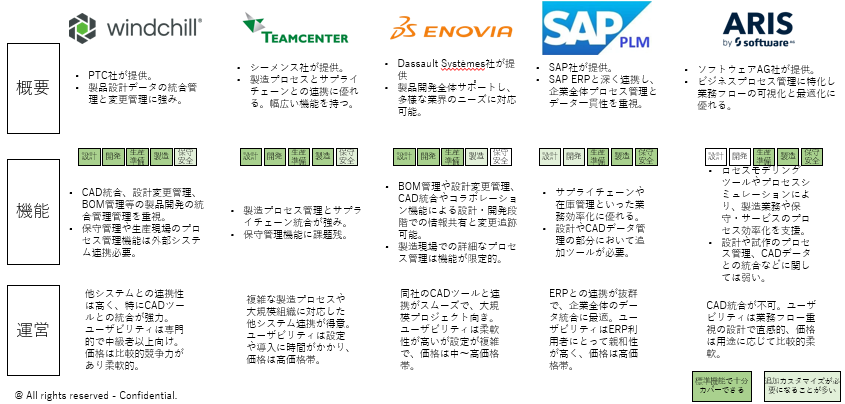
Unlike products from other vendors, SAP PLM is composed as a whole by combining ERP modules.
Source: SAP Product Lifecycle Management (PLM) | SAP Help Portal
Disclaimer: Content Accuracy is assured as much as possible. Discretion advised
- Common Issues
- FAQ
- Financials
- Important SAP notes
- Logistical functions
- Process descriptions
- Reporting
- Structures and Master Data
- Ways of Using Project System Module
SAP Document Management System
- DMS – General Information
- DMS in WebDynpro and Fiori
- DMS News
- Document Conversion Information
- Document Distribution (CA-DMS-DCD)
- Document Search (CA-DMS-RTV)
- EasyDMS (CA-DMS-EUI)
- ECL Viewer (CA-DMS-EAI)
- SAP GUI crashes with Adobe Reader 11
- CA – Overview
- Classification in PS
- Collection (CA-CL)
- Content submitted by Guests
- First Steps and Overview of Transactions
SAP Portfolio and Project Management
- Important Information for Portfolio and Project Management
- Portfolio Management
- Project Management
- PPM Common Functions
- Further useful content
- PLM Audit Management
- Quality Control
- Quality Inspection
- Quality Management FAQs
- Quality Notifications
- Quality Planning
SAP Collaboration Folders (PLM-CFO)
- CF – Documents
- cFolders Configuration Guidelines
- cFolders FAQs
- Known Problems In cFolders
- Standard Roles- cFolders
- Standard table- cFolders
Recipe Development (PLM-WUI-RCP)
- Recipe
- Recipe Development Knowledge Space
- SAP PLM Recipe Development – Reporting Capabilities
- SAP Recipe Development – Implementation Partners
- SAP Recipe Management (PLM-RM) – the last archive (site under construction)
- SAP Recipe Management – Trial Management
Engineering Change Management (LO-ECH)
- Authorisation Objects
- Change Master Management
- ECH Tables
- ECM – Helpful Resources
- Engineering Change Record
- SAP ECM – BAdI
- SAP ECM – User Exits
- Transaction CCUNDO
- Transaction Codes in Engineering Change Management
SAP Multiresource Scheduling (MRS)
Environment, Health and Safety (EHS)
- Changes in EHS Classic After System Conversion to SAP S4HANA On-Premise Edition
- EH&S Classic Transaction Codes
- EHS* (Environment, Health and Safety)
- EHS Classic and EHSM DataSources
- EHS Classic Data Archiving
- EHS Folder Disappears from the SAP Easy Access Menu after Upgrade to EHP7
- EHS KBAs, FAQ Notes and Guided Answers
- EHS-MGM* (SAP EHS Management)
- SAP EHS WhatsApp Broadcast History
SAP Commercial Project Management (CPM)
- BOM Basics
- BOM Enhancements and BAdIs
- BOM Recursion
- BOM Tables
- BOM Transaction overview
- Product Structure Using iPPE in PLM(Part 2)
- Reports For Bill Of Material’s (BOM)
- Archiving Material Master
- Archiving Special Stocks
- Authorization in Material Master
- Barcodes (EAN, GTIN, UPC) in Material Master
- Changing batch management requirement flag
- Getting started in material master
- Maintenance Status
- Material Master BAPIs
- Material Master Data Structures
- Material Master FAQs And Consulting Notes
- Material Master Number Ranges
- Material Master transactions
- Material Valuation
- Profit center changing troubleshooting guide
- The role of history tables- period closing example
- User exits, BAdIs and BTE in Material master
- Working with MRP Profile, MRP Type
SAP PLM 7.01 for Discrete Industry
- Access Control Context
- Bill of Materials
- Business Context Viewer (BCV)
- Document Management System
- Guided Structure Synchronization (GSS)
- Material Master
- Netweaver Business Client(NWBC) Search
- Object Navigator
- PLM WebUI 3 with EHP 6
- Process Route
- Product Assembly
- Product Structure Management
- Standard Single roles for PLM 7.01
- Standard table for PLM 7
- Visual Enterprise Viewer
- Web based Workflow Inbox
- Collection
- Content submitted by Guests
- Introduction to LO-VC
- Overview (LO-VC)
- Staging Area for SAP Variant Configuration
- Tutorials
- Article Master Tables
- Article Master Transactions
- Deletion flag for articles- discontinuation
- Getting Started in the Article Master
- Mass Change
- Performance in Retail
- Reference handling
- Reports and Notes in Retail
- The Hierarchy in Retail
- User exits and BADIs
- User Exits and BADIs in Retail
- [TEST CASE]Set Up Batch Derivation in Production Process
- Automatic Creation of Batches for Production Orders
- FAQ during batch level conversion
- Set Up Batch Determination in Inventory Management
- Set Up Batch Determination in Production Planning
- Set Up Batch Determination in Sales and Distribution
- Trouble Shooting in Batch Determination
SAP Community Topic Page:
SAP ERP Product Lifecycle Management
SAP Environment, Health, and Safety Management
Help!
- SAP QM Learning Map
- SAP PLM Learning Material
- SAP PLM FAQ and Notes
- SAP PLM Links
- Online Documentation
- SAP’s Customer Network for R&D and Engineering
- SAP PLM Consulting Germany – Welcome

Have a question about this article?
Ask the author directly — no sales pitch, just an answer.
Ask about this article →